
Edition overview
One focused DynamoDB client, two editions
DynamoDweep Community is the free, open-source desktop client. It covers connection management, table administration, data exploration, item editing, local databases, and backups without requiring a DynamoDweep account.
DynamoDweep Pro contains the full Community feature set and adds secure enterprise authentication, reusable query workflows, environment reproduction, developer code generation, richer data tools, and repository-derived access-pattern modeling. Pro is currently offered through early access ahead of its public paid launch.
Everyday DynamoDB administration
Free forever, Apache 2.0 licensed, local-first, and available as source code plus a Windows 64-bit installer.
Repeatable developer workflows
Everything in Community, plus workflow automation and power-user tools for developers who work in DynamoDB every day.
Community edition
Free and open-source features
The capabilities in the next six sections are available in DynamoDweep Community and are also included in Pro.
Connections
Connect to AWS or a custom endpoint
AWS named profiles
Discover and use named profiles from ~/.aws/config and ~/.aws/credentials. This keeps the app aligned with the AWS configuration developers already use.
Access keys
Connect with an access key ID, secret access key, and optional session token. Choose any supported AWS region before testing or opening the connection.
DynamoDB Local and LocalStack
Use a custom HTTP endpoint such as http://localhost:8000. DynamoDweep supplies dummy credentials for local connections.
Saved connections
Name, save, edit, test, open, and delete connection definitions on the current computer. The connection screen shows the exact local storage path.
Multiple open connections
Open several AWS accounts, profiles, regions, or local endpoints at once and switch between them using connection tabs.
Local-first operation
The desktop app connects from the user’s computer to the selected DynamoDB endpoint. Community does not require a DynamoDweep account.
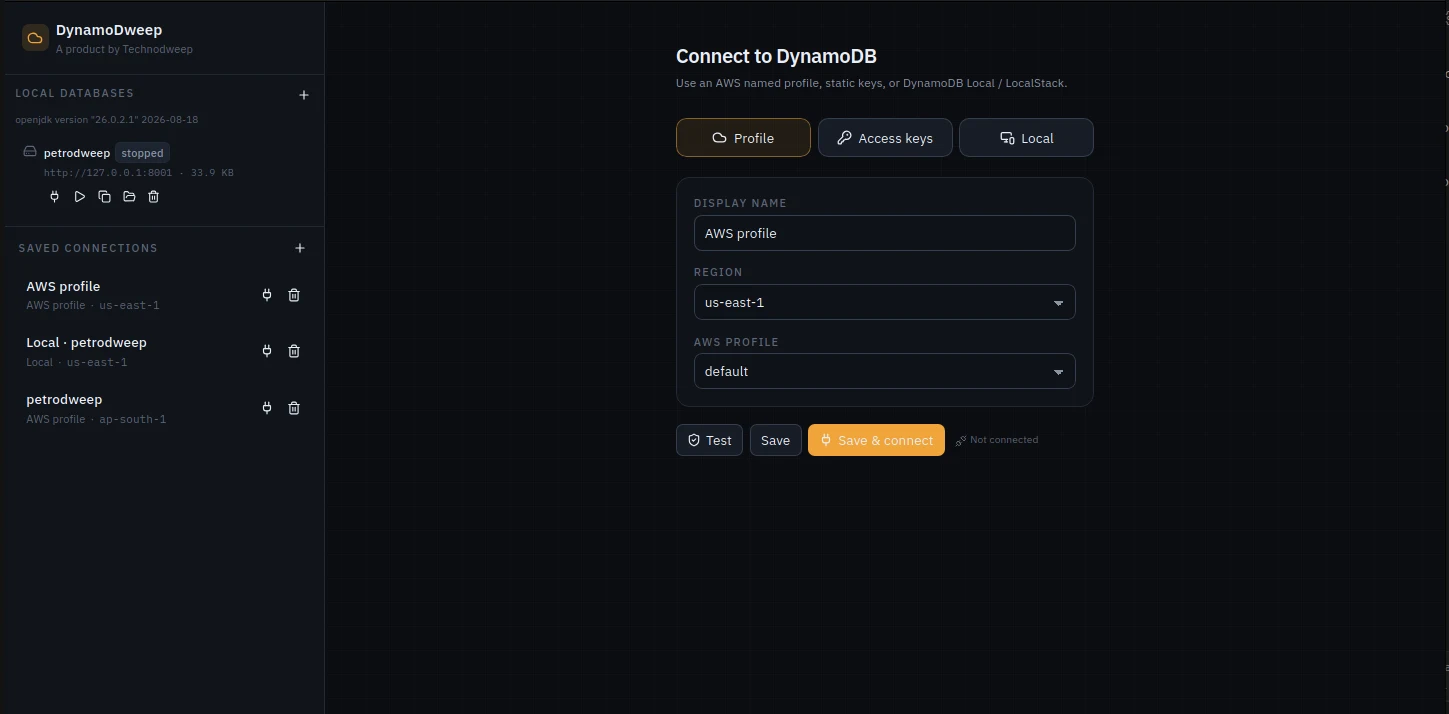
connections.json file and does not currently encrypt stored secrets. Prefer named profiles or short-lived credentials and protect that file. Pro moves access-key secrets and access-key session tokens into the operating-system keychain.
Local development
Manage DynamoDB Local inside the app
The built-in local database manager creates isolated DynamoDB Local environments—one named data folder per project—without requiring a separate launcher.
- Create named persistent databases whose data remains after the process stops.
- Create in-memory databases whose data is discarded when they stop.
- Start, stop, open, duplicate, and delete a local database from the connection screen.
- See each running instance’s assigned port, endpoint, storage size, and runtime state.
- Reveal a database’s data folder in the operating-system file manager.
- Download the official DynamoDB Local runtime on first use; the roughly 50 MB engine is stored in Application Support and is not bundled with DynamoDweep.
Tables and schemas
Create, inspect, and administer tables
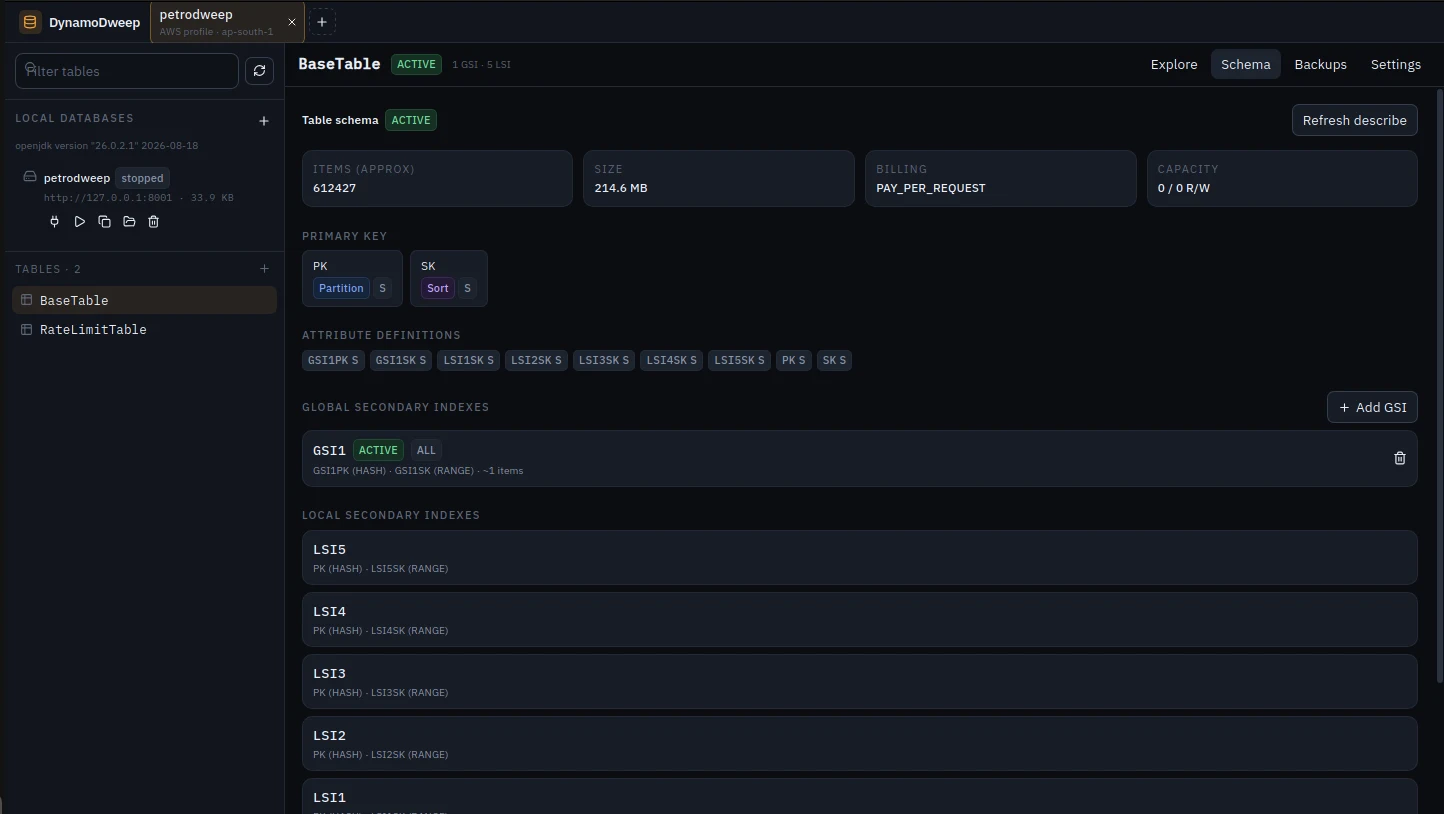
Table navigation and inspection
- List, refresh, and filter table names within the active connection.
- Inspect table status, ARN, class, creation time, approximate item count, approximate size, billing mode, and read/write capacity.
- Inspect the primary partition and sort keys, key attribute types, all attribute definitions, GSIs, and LSIs.
- Review index status, key schema, projection type, non-key attributes, approximate item count, and size where DynamoDB provides them.
Create a table
- Define a partition key and optional sort key using DynamoDB string, number, or binary key types.
- Select on-demand capacity or provisioned capacity with explicit read and write capacity units.
- Define global secondary indexes and local secondary indexes during table creation.
- Choose
ALL,KEYS_ONLY, orINCLUDEprojection modes for GSIs created with the table. - Enable DynamoDB Streams with new-and-old images and optionally enable deletion protection.
Change an existing table
- Add a GSI with its own partition key, optional sort key, and attribute types; remove existing GSIs with confirmation.
- Enable TTL on a chosen attribute or disable TTL.
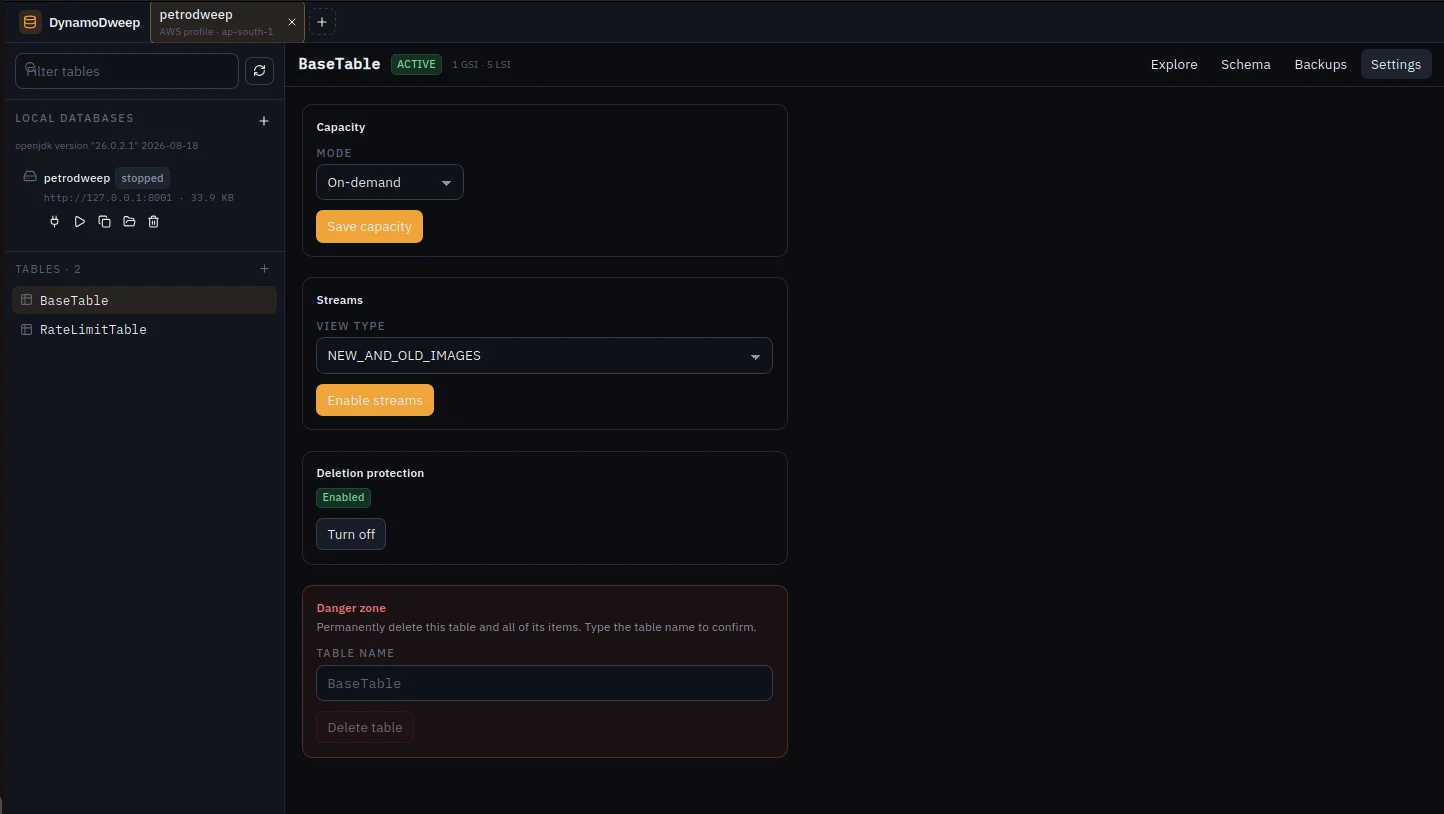
- Switch between on-demand and provisioned billing and update RCU/WCU values.
- Enable or disable streams and choose
KEYS_ONLY,NEW_IMAGE,OLD_IMAGE, orNEW_AND_OLD_IMAGES. - Turn deletion protection on or off.
- Permanently delete a table only after typing its name to confirm the operation.
Explore and query
Four ways to read DynamoDB data
Query
Query the base table, a GSI, or an LSI. Enter the partition-key value and combine it with an optional sort-key condition.
Scan
Scan a table or index and combine multiple attribute filters before paging through results.
Get item
Retrieve a single item by its complete primary key, with an optional strongly consistent read.
PartiQL
Run a PartiQL statement directly and page through statements that return additional results.
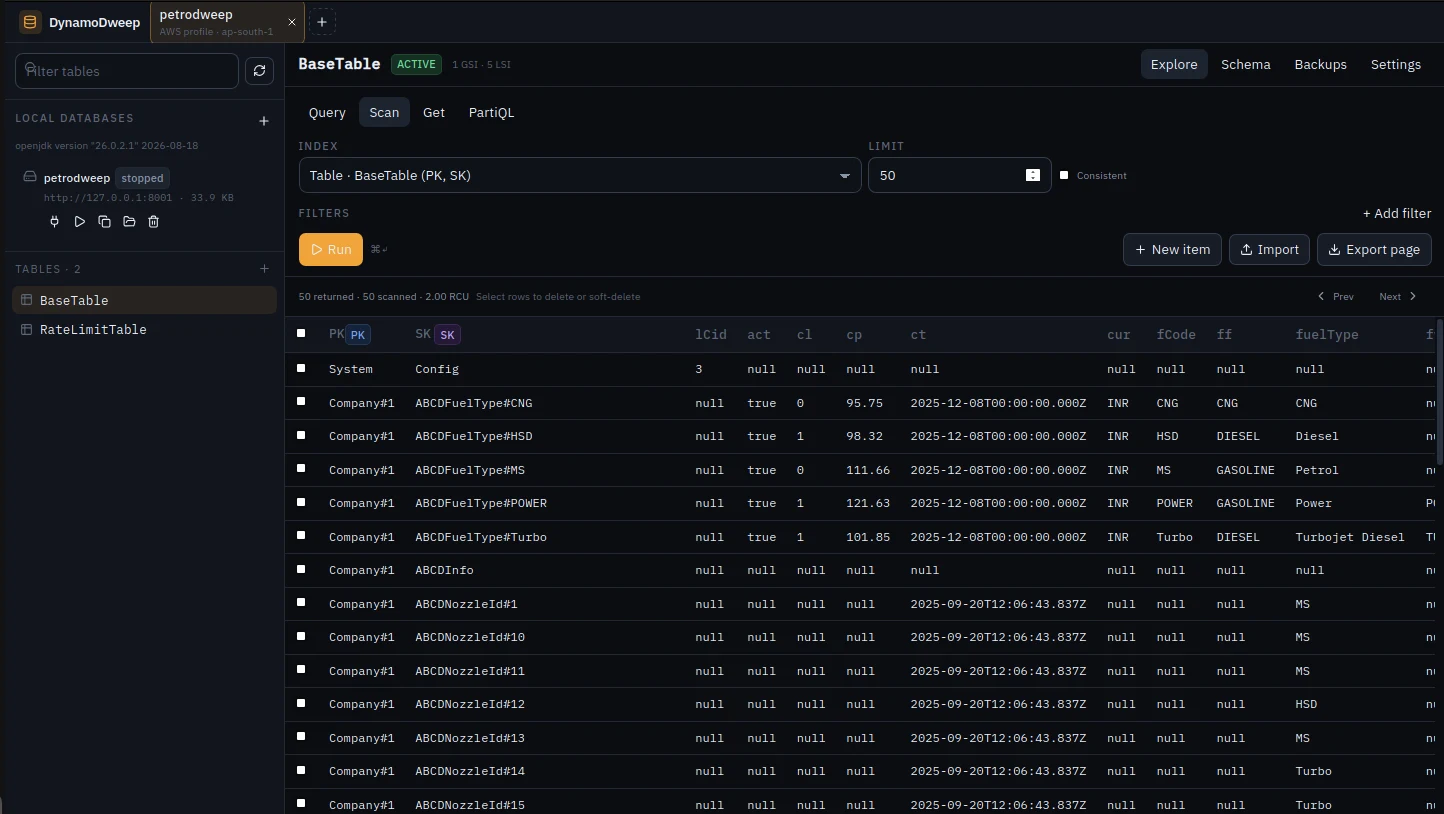
Query controls
- Use sort-key operators
=,<,≤,>,≥,begins_with, andbetween. - Use filters with equality, comparisons,
between,begins_with, not-equal,contains,exists,not exists, andin. - Choose string, number, boolean, or null filter values.
- Set a result limit, query in ascending or descending sort-key order, and request consistent reads where the selected operation supports them.
- Move forward and backward through pages using DynamoDB’s last-evaluated key.
- See returned and scanned counts plus consumed capacity units for each request.
- Copy an individual item as JSON without opening the editor.
- Run requests from the keyboard with Ctrl/⌘ + Enter.
Items and data safety
Edit, transfer, and remove items deliberately
Create and edit
Create or update an item using normal document JSON or typed DynamoDB JSON. New-item forms begin with the table’s required key attributes.
JSON import and export
Import one JSON object or an array of objects with a batch write. Export the current results page as a JSON file.
Single and bulk delete
Delete one item, select individual result rows, select the full current page, or permanently delete the selected set after confirmation.
Soft delete
Keep an item in the table while moving it away from its live key. The operation writes a copy with a renamed string partition key, sort key, or both, then deletes the original after the copy succeeds.
Configurable soft-delete behavior
- Prefix or suffix a string key with a custom token such as
DELETED#. - Choose the partition key, sort key, or both when their DynamoDB types are strings.
- Preview old and new keys before applying the operation.
- Optionally stamp
_deletedAtand_originalKeysmetadata. - Skip selected items that already appear to use the configured soft-delete token.
- Review succeeded, skipped, and failed counts for batch mutations.
On-demand backups
Back up and restore AWS-hosted tables
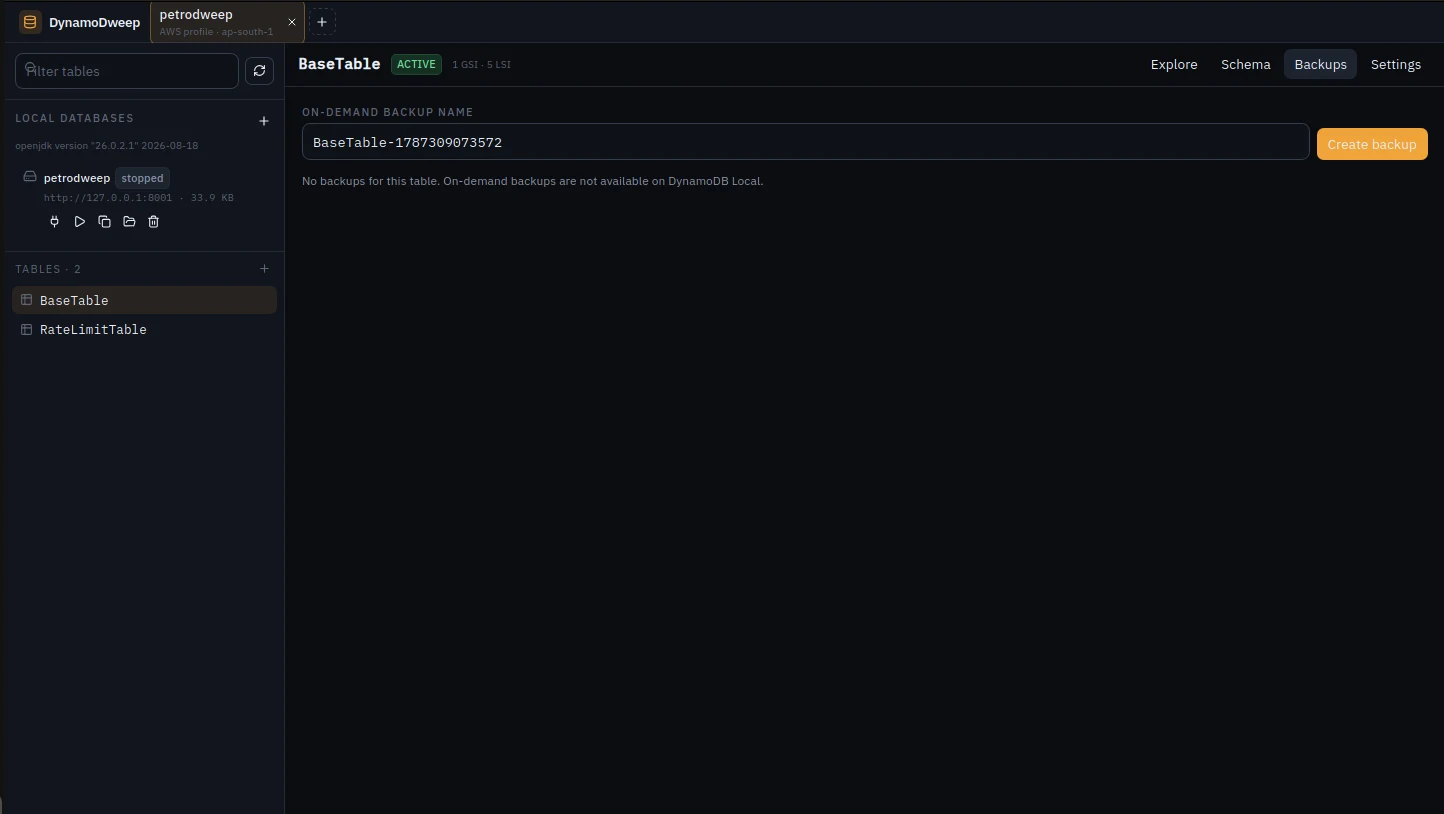
- Create a named, on-demand backup for the selected table.
- List backups and review name, status, backup type, creation time, and size.
- Restore an available backup to a new DynamoDB table name.
- Delete an on-demand backup after confirmation.
DynamoDweep Pro
Advanced access and developer workflows
Pro includes every feature described above. The sections below document the capabilities added only by DynamoDweep Pro.
Enterprise connection options
IAM Identity Center (SSO)
Connect with an AWS IAM Identity Center start URL, SSO region, account ID, permission set or role name, and optional SSO session name. Run aws sso login first so the AWS credential cache is available.
IAM role assumption
Assume an IAM role from a source AWS profile. Configure the role ARN, an optional external ID, and a role session name.
OS keychain storage
Store access-key secrets and access-key session tokens in macOS Keychain, Windows Credential Manager, or FreeDesktop Secret Service on Linux. The connection JSON retains only the key ID and a keychain marker.
Automatic secret migration
Existing plaintext access-key secrets are moved into the operating-system keychain the next time Pro starts or the connection is saved.
Reusable query workflows
Save the request, keep the context
Named saved queries
Save Query, Scan, Get item, or PartiQL forms per table. A saved entry retains index, key values and operators, filters, limit, ordering, and consistent-read choice.
Automatic history
Keep the last 40 distinct runs for each connection and table. Restore a previous request with one click or clear that table’s history.
Multi-table workspace
Keep several tables open as tabs inside each connection. Each table retains its own Explore, Schema, Backups, and Settings workspace.
Command palette
Open with Ctrl/⌘ + K to jump to tables, switch or open connections, close a session, open access patterns, create or duplicate tables, generate samples, copy schemas, or export IaC.
Environment reproduction
Bring a real schema shape to Local
Copy schemas into DynamoDB Local
- Preview tables from any saved source connection against a named managed Local database.
- Select individual tables, every table, or only tables missing from the destination.
- Recreate partition keys, sort keys, GSIs, LSIs, DynamoDB Streams settings, and TTL configuration.
- Create a new named Local database without leaving the copy workflow.
- Optionally seed the first N scanned items from each source table.
Compare and repair Local schemas
- Classify destination tables as missing, matching, or different.
- Review primary-key, attribute, index, stream, and TTL differences.
- Create one missing table or all missing tables.
- Add GSIs that exist in the source but are missing from the Local destination.
Duplicate a table on the same connection
Create a new table with the source table’s keys, GSIs, LSIs, streams, and TTL. Optionally copy a bounded sample of items into the new table.
Pro data tools
Work with data beyond raw JSON
CSV import with mapping
Map each CSV column to an item attribute, rename attributes during import, or leave a mapping empty to skip it. Required partition and sort keys are validated before the batch write.
CSV value conversion
Convert recognizable numbers, booleans, null values, JSON objects, and JSON arrays from CSV cells while retaining other values as strings.
CSV export
Export the complete current results page or only the selected rows. Nested maps and lists are serialized as JSON cell values.
Visual tree editor
Edit maps and lists without manually balancing JSON. Choose string, number, boolean, null, binary, map, list, string-set, or number-set values, then switch back to JSON when needed.
Key-aware sample data
Generate up to 500 sample items. The generator fills every key needed by the table, GSIs, and LSIs, handles string, number, and binary key types, and adds sample and creation-time markers.
Bounded item copies
Use explicit limits when duplicating a table or seeding Local so development workflows do not accidentally become unbounded production exports.
Code and infrastructure
Carry an explored request into the codebase
AWS SDK code generation
Generate code from the currently configured Query, Scan, Get item, or PartiQL request. The generated snippet carries over the connection region, table and index names, key conditions, filters, values, result limit, sort order, and consistent-read setting where applicable.
- TypeScript and JavaScript: AWS SDK for JavaScript v3 with the DynamoDB document client.
- Python:
boto3DynamoDB resource and condition expressions. - Rust: the official
aws-sdk-dynamodbcrate. - Preview and copy the generated code directly from the modal.
Infrastructure-as-code schema export
Export the selected table’s primary keys, secondary indexes, projections, stream configuration, and TTL configuration into:
- AWS CDK with TypeScript
- Terraform HCL
- AWS CloudFormation YAML
Access-pattern workspace
Turn application repositories into a DynamoDB query catalog
Pro’s Patterns workspace links one or more local application repositories to a DynamoDB connection. It builds and persists a model of entities, tables, indexes, keys, and access patterns so the database can be explored in the language of the application that uses it.
Repository analysis
- Link one or more repository folders to each connection.
- Run a local heuristic scan with No AI; no agent or API key is required.
- Optionally use Grok Build, Claude, or Codex through an available Agent Client Protocol (ACP) CLI session.
- Resume the same agent session so follow-up analysis keeps context, or deliberately begin a new session.
- Stream agent progress and model updates inside the app, inspect the activity log, and stop a running analysis.
- Fall back to the supported one-shot provider path when an ACP session is unavailable or fails.
- Persist the connection model and agent workspace under the app’s local Application Support directory for reuse.
Query catalog and model
- Browse access patterns through hierarchical entity groups and a catalog that maps each request to its table, index, and keys.
- Search the catalog by query, key, or GSI and filter by operation, index, or live table.
- Inspect each access pattern’s operation, logical table, index, keys, description, and source references.
- Create custom named pattern sets around a topic, generate them with the configured agent, continue the set later, or delete the set.
- Ask follow-up questions to improve the catalog without rebuilding the entire model.
From pattern to live query
- Resolve a model’s logical table to an available live table on the active connection.
- Open and run a pattern in an Explore tab with the operation, index, key conditions, and filters prefilled.
- Plan and run a natural-language live query from Explore using the saved model and linked repository context. The filled query form and planning reason remain visible for inspection and reuse.
- Keep pattern-derived requests bounded by the Explore result limit. AI analysis is optional and no other part of DynamoDweep requires it.
Complete feature comparison
Community and Pro, capability by capability
| Capability | Community | Pro |
|---|---|---|
| AWS named profiles | Included | Included |
| Access keys and optional session token | Included | Included |
| DynamoDB Local, LocalStack, and custom endpoints | Included | Included |
| Saved and simultaneously open connections | Included | Included |
| Named persistent/in-memory Local database manager | Included | Included |
| Table list, filter, create, inspect, and delete | Included | Included |
| Primary keys, GSIs, LSIs, and projections | Included | Included |
| Capacity, streams, TTL, and deletion protection | Included | Included |
| Query, Scan, Get item, and PartiQL | Included | Included |
| Pagination, filters, sort operators, and consumed capacity | Included | Included |
| Document JSON and DynamoDB JSON editing | Included | Included |
| Single, bulk, and configurable soft delete | Included | Included |
| JSON import and current-page export | Included | Included |
| Create, list, restore, and delete backups | Included | Included |
| IAM Identity Center (SSO) | — | Included |
| IAM role assumption | — | Included |
| OS keychain storage for access-key secrets | — | Included |
| Saved Query/Scan/Get/PartiQL requests | — | Included |
| Last 40 distinct requests per connection and table | — | Included |
| Multi-table workspace tabs | — | Included |
| Copy and compare schemas with Local | — | Included |
| Local item seeding and missing-GSI sync | — | Included |
| Duplicate table with an optional item sample | — | Included |
| CSV import mapping and page/selection export | — | Included |
| Visual item tree editor | — | Included |
| Key-aware sample item generator | — | Included |
| TypeScript, JavaScript, Python, and Rust SDK generation | — | Included |
| CDK, Terraform, and CloudFormation export | — | Included |
| Command palette | — | Included |
| Local heuristic access-pattern analysis | — | Included |
| Optional Grok, Claude, and Codex agent analysis | — | Included |
| Pattern sets, persisted model, and live-query planning | — | Included |
Requirements, behavior, and limits
Operational notes
Available downloads
A Windows 64-bit MSI and Linux x86-64 packages are available now. The open-source Tauri project can also be built from source for supported desktop platforms.
Local requirements
Managed DynamoDB Local instances require Java 11 or later and a one-time runtime download. Direct custom-endpoint connections do not use the built-in manager.
Approximate statistics
Table item counts and sizes come from DynamoDB’s periodic DescribeTable statistics and are not live counts.
Consistent reads
DynamoDB supports strongly consistent reads on base tables and LSIs, but not on GSIs. DynamoDweep disables unsupported choices in its request workflow.
Backup scope
On-demand backup operations are for AWS-hosted DynamoDB tables and are unavailable in DynamoDB Local.
Independent product
DynamoDweep is a product by Technodweep. It is not affiliated with or endorsed by Amazon Web Services.

Ready to explore?